MercuryWM: Transforming Your New Tab Page into a Multi-Windowed Terminal Environment
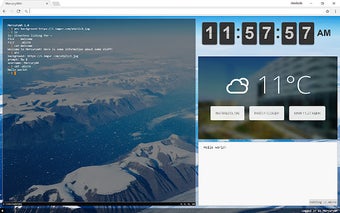
MercuryWM is a Chrome add-on developed by Avadonia314 that revolutionizes the way you interact with your new tab page. With MercuryWM, your new tab page is transformed into a multi-windowed terminal environment, providing you with a powerful and efficient workspace.
One of the key features of MercuryWM is the ability to split and resize windows, allowing you to create your dream layout. Whether you prefer a single large terminal or multiple smaller ones, MercuryWM gives you the flexibility to customize your workspace to suit your needs.
In addition to the terminal functionality, MercuryWM allows you to type commands directly into the terminals. This enables you to execute various commands and perform tasks right from your new tab page, saving you time and effort.
Another standout feature of MercuryWM is the ability to run online scripts to add custom functionality. This opens up endless possibilities for extending the capabilities of MercuryWM and tailoring it to your specific requirements.
With MercuryWM's built-in file system, you can easily store and manage your data. This eliminates the need for external storage solutions and ensures that your files are always accessible and organized within the add-on.
Furthermore, MercuryWM includes a module manager that simplifies the installation and updating of modules. This makes it easy to enhance the functionality of MercuryWM by adding new modules or updating existing ones.
To get started with MercuryWM, simply install the add-on and explore the list of available commands on the official GitHub page. Discover the power of a multi-windowed terminal environment right on your new tab page with MercuryWM.
Please note that MercuryWM is available for Chrome users and is completely free to use.